
CoolRead- Enchanting Reads
Apps and Live Wallpapers by JuuPersonalization
4.340.00 Reviews
- Version
- 1.4.1
- Installs
- 10.00K
- Age Rating
- Mature 17+
Screenshots
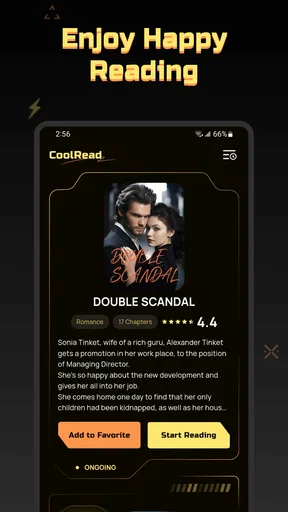
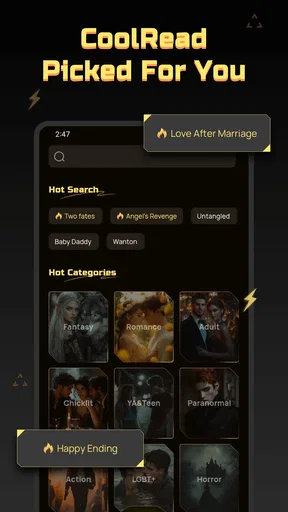
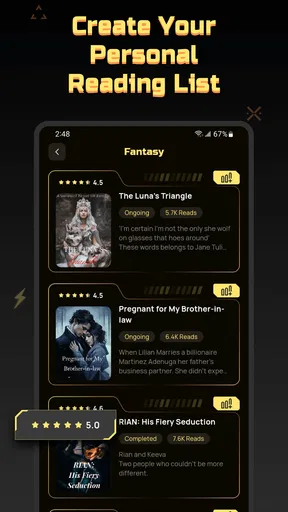
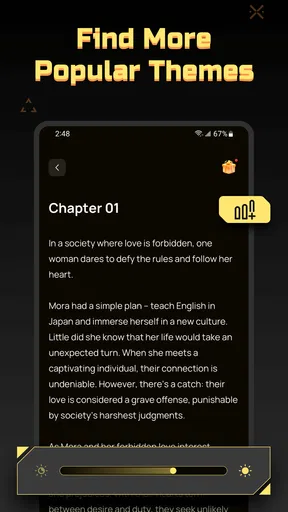
Our Review of CoolRead- Enchanting Reads
 Analysis by Appyee
I approached CoolRead- Enchanting Reads as a reader looking for a simple way to discover stories and return to them without turning the experience into a project. It belongs to the personalization side of mobile apps, although its purpose is more focused than changing an icon pack or decorating a home screen. The basic idea is to make reading feel easy to pick up whenever I have a spare moment, whether that is during a quiet morning, a commute, or the few minutes before bed.
That simplicity is both its appeal and the first thing I would ask you to consider. This is not an app I would choose because I want a complete digital library, advanced reading analytics, or a highly configurable book-management system. I would choose it when the priority is finding something engaging and keeping the path from discovery to reading uncomplicated. The developer, Apps and Live Wallpapers by Juu, presents it as a free app, while optional purchases range from under a dollar to around a hundred dollars per item. That makes the starting point easy to try, but it also means I would pay attention to what I actually use before spending.
How I decided whether CoolRead fits
My first decision criterion was whether the app reduced the effort required to start reading. Many reading services are full of shelves, filters, lists, accounts, recommendations, and settings. Those tools can be useful, but they can also turn a casual reading session into browsing through a catalog. CoolRead makes more sense for someone who wants a direct route to a story rather than a complete personal library system.
The second criterion was the kind of reader it serves best. If you already know the exact titles you want and carefully organize them by author, genre, or reading status, a dedicated ebook reader or library app may be a better match. If, on the other hand, you often say that you want to read more but spend too long deciding what to read, a discovery-first experience has a practical advantage. The app’s central promise is not about replacing every reading tool; it is about helping the next story feel easier to choose.
I also considered how well it works in short sessions. A good mobile reading app should make sense when I have only a few minutes, not just when I can settle in for an hour. That changes what matters. Clear presentation, low friction, and an inviting path back into a story are more important here than a long list of specialist controls. I found that this is the lens through which CoolRead should be judged.
There is also a useful distinction between personalization and productivity. A productivity-oriented reading tool might focus on targets, notes, highlights, or progress management. CoolRead sits closer to the personal side of reading: it is about making the experience feel pleasant and accessible. That is a strength for relaxed readers, but it may feel limited to anyone who expects a study companion.
A realistic everyday test
Imagine finishing dinner with twenty minutes before the next task of the evening. I would not want to search across several services, compare long descriptions, and then configure a reading session. I would open CoolRead, look for a story that matches my mood, and begin. If I stop after a few pages, the value is that I was able to read at all instead of abandoning the idea because choosing a book felt like work.
That same workflow can suit a weekend break or a short wait in a public place. It is less compelling for a person who reads only long-form books in carefully planned sessions and wants a large-screen reading setup. In that case, a conventional ebook platform may offer a more complete environment. CoolRead is most convincing when reading is something I want to fit naturally into the day.
What the app’s current position tells me
CoolRead is still a relatively young option, released on November 26, 2024. Its current version is 1.4.1, and it requires Android 7.0 or later. I would not treat its age as a flaw by itself, but I would set expectations accordingly: readers who depend on a mature ecosystem, extensive integrations, or years of accumulated library tools may prefer an established alternative.
At the same time, its early stage can be attractive if you want a focused app rather than one overloaded with features. The app has an average rating of 4.3 from around two hundred ratings and has passed ten thousand installs. Those figures suggest that it has found an audience, while also reminding me that it has a smaller footprint than the biggest reading platforms. I would try it personally before making it the only place I read.
Where CoolRead works particularly well
The strongest part of the experience is its approachable purpose. I do not have to think of myself as a serious book collector to use it. The app is suitable for someone who wants to discover a story, read when convenient, and keep the experience relaxed. That makes it friendlier than tools that assume I already have a carefully prepared reading list.
I also like the way its personalization category sets the tone. The app feels less like a formal digital bookshelf and more like a small part of my personal routine. That distinction matters when I want reading to be restorative rather than measurable. There is no need to turn every session into a target or achievement. For many people, that lighter approach is precisely what makes reading easier to maintain.
A less obvious advantage is that a discovery-focused app can help break the habit of rereading the same familiar choices. When I use a traditional library that is already full of titles, I can spend too much time sorting what I own. An app centered on the next story gives me a reason to approach reading with curiosity. I would use that especially when I feel stuck between genres or do not have a particular author in mind.
Another useful workflow is to treat it as a “transition” app. I would use it after finishing a book, during a period when I am not ready to commit to another long title, or when I want something lighter between more demanding reads. That is different from asking it to become my permanent archive. Used this way, it fills a gap that many standard reading apps leave open.
Small habits that make the experience better
I would avoid opening CoolRead only when I have a large block of free time. Its value is easier to notice when I make it part of a small daily habit: a few pages with coffee, a short session while waiting, or a calm reading break before sleep. This approach matches the app’s promise of reading whenever it suits me instead of requiring a formal schedule.
I would also decide in advance what I want from each visit. Sometimes the goal is discovery; sometimes it is simply continuing a story. Mixing those two intentions can create unnecessary browsing. If I want to read, I would choose quickly and start. If I want to explore, I would give myself a short limit before committing. That simple separation keeps the app from becoming another place where I scroll without reading.
A third practical tip is to judge the app after several different moods rather than one session. A discovery tool may feel excellent when I want something fresh but less useful when I need a specific title. Testing it on a busy weekday, a relaxed weekend, and a short break gives a fairer picture of whether it genuinely fits my routine.
The free entry point is another clear advantage. I can test the basic experience without committing money immediately. Because individual in-app purchases can extend from $0.99 to $99.99, I would be careful with impulse buying. The sensible approach is to use the free portion long enough to understand whether CoolRead changes my reading habits before considering any optional purchase.
The mature 17+ content rating is also important when deciding who should use it. I would not recommend treating the app as automatically suitable for younger readers simply because it is a reading app. Adults should be comfortable with the intended age classification, and anyone choosing content for a family device should take that rating seriously.
The friction I would not ignore
The biggest limitation is that a simple discovery experience cannot satisfy every reading style. If I need detailed organization, academic annotation, extensive accessibility controls, or a carefully managed collection, I would look elsewhere. CoolRead’s appeal depends on not making those systems the center of the experience, but that also means some readers may find it too light.
I would also be cautious about confusing a pleasant starting point with a complete reading ecosystem. A person who owns books across several services may still need another app for purchases, storage, or long-term cataloging. That is not necessarily a problem, but it creates a two-app or multi-app routine. Before switching fully, I would ask whether I want discovery or consolidation. CoolRead is stronger at the former.
There is a possible cost-related friction as well. A free app with optional purchases is easy to install, but the wide purchase range makes it important to understand the value of anything paid before buying. I would not assume that the most expensive option is necessary, and I would avoid paying simply because I had already invested time in browsing. The best test is whether a purchase solves a problem I actually have.
How it compares with familiar alternatives
Compared with a standard ebook store, CoolRead is more appealing when I want inspiration rather than a precise shopping task. A store is usually the better choice when I know the title, author, or edition I want. CoolRead is the better candidate when my question is, “What should I read next?” That is a meaningful difference, not just a matter of interface style.
Compared with a library-management app, it is less suitable for cataloging everything I own. A library tool wins when sorting, tracking, and retrieving titles are central to my routine. CoolRead wins when too much organization becomes a barrier and I want the next reading choice to feel lighter.
Compared with a general web search, the app offers a more intentional reading context. Searching the web can produce endless recommendations, but it also creates distractions and makes quality harder to judge. CoolRead’s focused purpose is useful for readers who want to stay within a reading-oriented space. Still, people who enjoy researching authors, reviews, and publishing details may prefer the broader control of the web.
Compared with a productivity reading app, CoolRead is better for mood and spontaneity than for measurable progress. If I want reminders, targets, notes, or detailed statistics, I would choose the productivity option. If those systems make reading feel like homework, CoolRead’s lighter approach is likely more comfortable.
The cost of changing your routine
Switching to CoolRead does not have to mean abandoning every other reading service. I would begin with a limited trial: use it for discovering new stories while keeping my existing app for titles I already own or track. This minimizes disruption and makes the comparison fair. After a week or two of normal use, I could see whether I am actually reading more or merely browsing another catalog.
The main cost of switching is not installation; it is changing where I expect to find my reading history and saved choices. If you have a carefully maintained collection, moving completely may be more trouble than it is worth. In that situation, I would keep CoolRead as a discovery companion rather than forcing it to replace a system that already works.
There is also a mental cost to adding another service. Every extra app can create another place to check, another purchase decision, and another habit to maintain. CoolRead earns its place when it removes indecision. If it gives you one more feed to browse without helping you start a story, the switch has not improved your routine.
Who should install it, and who should skip it
I would recommend CoolRead to casual readers, people rebuilding a reading habit, and anyone who enjoys discovering stories without managing a large collection. It is especially suitable if your free time comes in short pieces and you want an inviting way to use those moments. It can also work well as a secondary app for readers who already have a main library but want fresh ideas.
I would skip it if I need a single, comprehensive home for purchased ebooks, detailed cataloging, serious study tools, or a tightly controlled family reading environment. The mature 17+ rating alone makes it a poor choice for younger users. I would also skip it if I dislike optional purchase models or prefer to know exactly what I am buying before I spend time inside an app.
Android users with a device running version 7.0 or newer can try it without paying an upfront price. That low-risk starting point is useful, but I would still read purchase prompts carefully and decide whether the app’s discovery style matches my habits. Free to install does not automatically mean it is the cheapest long-term option for every reader.
My recommendation after weighing the trade-offs
My recommendation is positive, but deliberately specific: try CoolRead if your main problem is choosing something enjoyable to read, not managing a digital library. Its focused, personal feel makes it easy to fit into ordinary moments, and the free starting point lowers the barrier to testing it. I would use it as a discovery and casual-reading companion rather than promise that it can replace every reading tool.
The app’s strongest quality is that it treats reading as something I can return to naturally. Its weaknesses appear when I ask it to become an archive, study system, or universal bookstore. That boundary is important. The right question is not whether CoolRead does everything; it is whether it makes your next reading session easier to begin.
For me, that is enough to make it worth trying, provided I keep the age rating and optional purchase range in mind. If you want a gentle route toward a new story and do not need an elaborate collection manager, I think you will understand its appeal quickly. If you want complete control, deep organization, or a single place for every book you own, a more established alternative will probably serve you better.
Verdict
Strengths of CoolRead- Enchanting Reads
- Curated stories make it easy to discover new reading material.
- Clean interface keeps browsing and reading pleasantly distraction-free.
- Suitable for short reading sessions during commutes or breaks.
- Story selections can appeal to readers seeking relaxing entertainment.
- Digital access removes the need to carry physical books.
Limitations of CoolRead- Enchanting Reads
- The selection may feel limited for readers with very specific tastes.
- Some stories may require an internet connection to access fully.
- Reading preferences and filters may not be detailed enough for everyone.
- New content availability may vary and feel inconsistent over time.
- Text display options might not satisfy users needing extensive customization.
Similar Picks in This Category
View All
Microsoft SwiftKey AI Keyboard
SwiftKey4.3

Wallpapers
Google LLC4.1

Zedge™ Wallpapers & Ringtones
Zedge4.7

Yandex Browser with Alice AI
Direct Cursus Computer Systems Trading LLC4.3

Ringtone Maker:create ringtone
Big Bang Inc.4.7

Fonts Keyboard
Fonts Keyboard3.9
Frequently Asked Questions
What is CoolRead- Enchanting Reads?
CoolRead- Enchanting Reads is a mobile reading app designed for people who enjoy discovering and reading digital stories in a convenient format. It brings a selection of fiction and other written content together in one place, allowing users to browse titles, open stories, and continue reading from their mobile device. The overall experience is focused on simple navigation and comfortable, on-the-go reading.
Is CoolRead- Enchanting Reads free to download and use?
The app may be available to download at no initial cost, but users should review the store listing carefully because some content or features could require payment, subscriptions, advertisements, or in-app purchases. Availability and pricing can also differ between Android and iOS. Before confirming a purchase, check the app’s payment terms, renewal conditions, and whether a free trial automatically changes into a paid subscription.
Does CoolRead- Enchanting Reads require an internet connection?
An internet connection is generally needed to download the app, access the catalog, load new stories, and synchronize reading activity. Depending on the version and the title, some reading material may be available for offline use after it has been downloaded, although this should not be assumed for every book or feature. Users with limited mobile data should download content over Wi-Fi whenever possible.
What devices are compatible with CoolRead- Enchanting Reads?
Compatibility depends on the operating system and the minimum version supported by the developer. Before downloading, check the official Google Play or Apple App Store page to confirm that your phone or tablet meets the requirements. Keeping the operating system updated can improve stability, while older devices may experience slower loading, limited functionality, or problems with newer app versions.
Is CoolRead- Enchanting Reads safe for children and suitable for every reader?
The suitability of CoolRead- Enchanting Reads depends on the stories available in its catalog, since reading material may vary in themes, language, romance, suspense, or mature content. Parents should review the store rating, privacy information, and any available parental controls before allowing younger users to access the app. It is also wise to examine permissions and avoid sharing unnecessary personal information.
